Is your Crunchyroll app failing to load? Or are you repeatedly encountering a ‘Request Time Out’ or ‘Server Connection error’ messages? With the worldwide premieres of new anime seasons in April 2026, such as *The Beginning After the End Season 2* and *One Piece: Elbaph Arc*, the load on Crunchyroll’s server has increased significantly.
Additionally, following the Telus Digital security incident that occurred in March 2026 (which affected approximately 7 million users), many users have been experiencing difficulties with Crunchyroll logins and account access. In this guide, we will show you how to determine whether Crunchyroll’s servers are down, and how to resolve these issues on your Roku, Firestick or mobile device in just 2 minutes.
Important Note: Before attempting to fix any Crunchyroll on Roku, Firestick or any other device you are using, it is crucial to gather accurate information about the issue and identify its root cause, whether it is a server outage or a local glitch within the app.
Quick Check: Is Crunchyroll Download Right Now? (April 1, 2026)
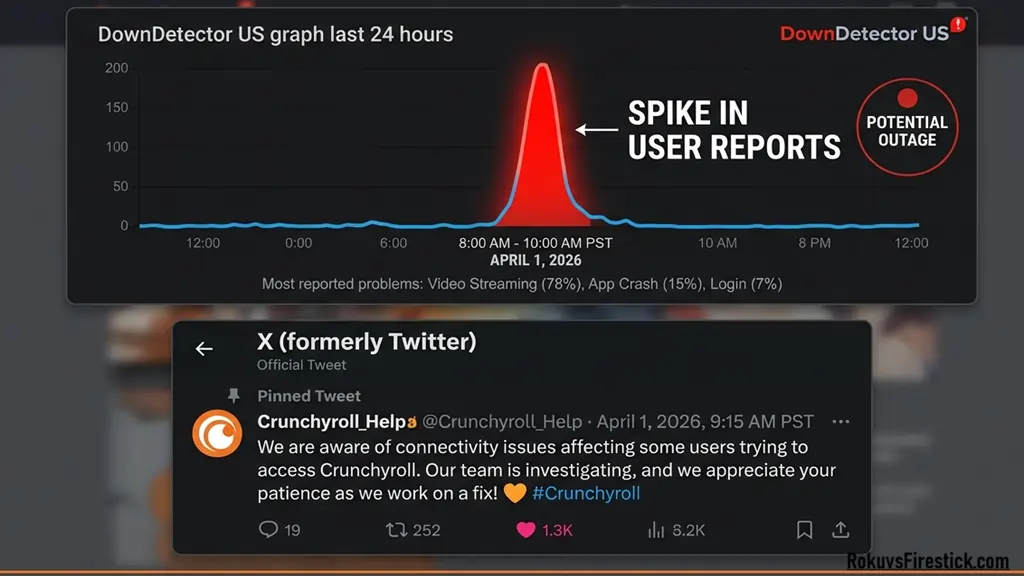
Before beginning any troubleshooting steps, it is essential to confirm whether the issue is isolated to your specific device or if the servers are down globally. To do this, you can utilize the three trusted methods listed below:
- Official Twitter (X) Status Updates: Crunchyroll’s support team frequently posts information regarding major outages on their official handles, @Crunchyroll or @Crunchyroll_Help. If server maintenance or a technical glitch is currently underway, you will find “real-time updates” posted there. Please keep in mind that, as of April 2026, numerous “scheduled maintenance” events are underway to implement new security patches.
- DownDetector (US Outage Map): If you suspect the app is running slowly, visit the DownDetector website and search for “Crunchyroll.” If you observe red spikes on the “Live Outage Map” (Particularly in US regions such as New York, California, or Texas), you can assume that this is a global issue and that you simply need to wait.
“If you have checked and Crunchyroll’s server is indeed down, you will need to exercise a little patience. While the servers are being restored, you can check the[Crunchyroll Schedule]for upcoming anime releases, so you know exactly when your favorite shows are set to air.”
- Spring Season Traffic Peak (PT Time): The April 2026 anime season is quite extensive. When major episodes, such as *The Beginning After the End* Season 2 or *Re: Zero* Season 4, are released, millions of users login simultanously. Due to this “high-traffic,” servers may temporarily return a “Request Timed Out” error. If you experience buffering, always try accessing the content 30-40 minutes after the episode has been released.
“If you are unable to stream videos, don’t worry, you can pass the time by reading [Crunchyroll Manga] where the server load is lower compared to streaming.”
March 2026 Data Breach & Login Issues (High Priority)
If the server status appears “Green,” yet you are still unable to log in to your account, the cause may be the Telus Digital security incident that occurred on March 12, 2026. Reports indicate that approximately 6.8 million users‘ data, including emails, IP addresses, and support tickets, was leaked during this breach.
- Urgent Password Reset: As a security measure, Crunchyroll has “Forced logged out” numerous accounts. If your old password is no longer working, immediately click on “Forgot Password” and create a new, strong password. This is currently the most common issue that the US market is facing.
- Enable 2FA (Two-Factor Authentication): To protect your account from hackers, be sure to enable 2-step verification by navigating to your settings. If your account appears “Locked,” this may be a “Protective Action” taken by Crunchyroll’s security team to ensure the safety of your data.
Causes Behind Crunchyroll Down Error
The biggest reason behind any site going down is the increased traffic load on its servers. The same situation can happen with the Crunchyroll.com website or app.
When traffic exceeds the server limit, Crunchyroll Down appears. This situation is mostly seen at night or sometimes during the weekends when more people reach the website or app to watch anime at the same time.
However, Crunchyroll or any streaming company always monitors this kind of error or checks it periodically to ensure that the customer is not facing any such problem.
There are also several other reasons why Crunchyroll is down:
- Technical Difficulties:

Crunchyroll is down because of Technical Difficulties
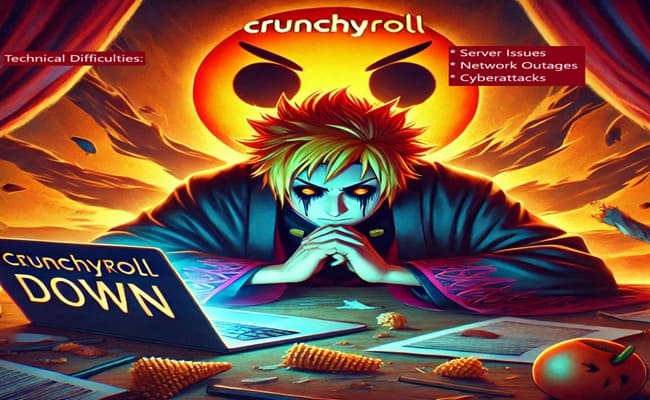
- Server Issues: The most common reason behind this problem is a technical problem with Crunchyroll’s server, which can cause the site or app to crash or slow down. However, this is not necessarily the only reason for the Crunchyroll error to appear, so here are some other reasons mentioned as well.
- Network Outages: Interruptions in network connectivity may cause the site or app to stop functioning.
- Cyberattacks: Cyberattacks may also disrupt Crunchyroll’s services.
2. High Traffic:
- As we mentioned earlier, if too many users are using Crunchyroll at the same time, the site may slow down or even crash.
3. Maintenance Work: Crunchyroll occasionally performs maintenance work to improve or update the Site or app, which may temporarily interrupt service.
How To Fix Crunchyroll Not Working (Device-Specific Guide)
Your streaming hardware often crashes due to software glitches or “memory leaks.” Since Crunchyroll rolled out its new UI update in April 2026, old cache files are conflicting with the new version. You can fix this in just 2 minutes by following the steps below:
For Amazon Firestick Users (Fire TV Cube & Stick 4K)
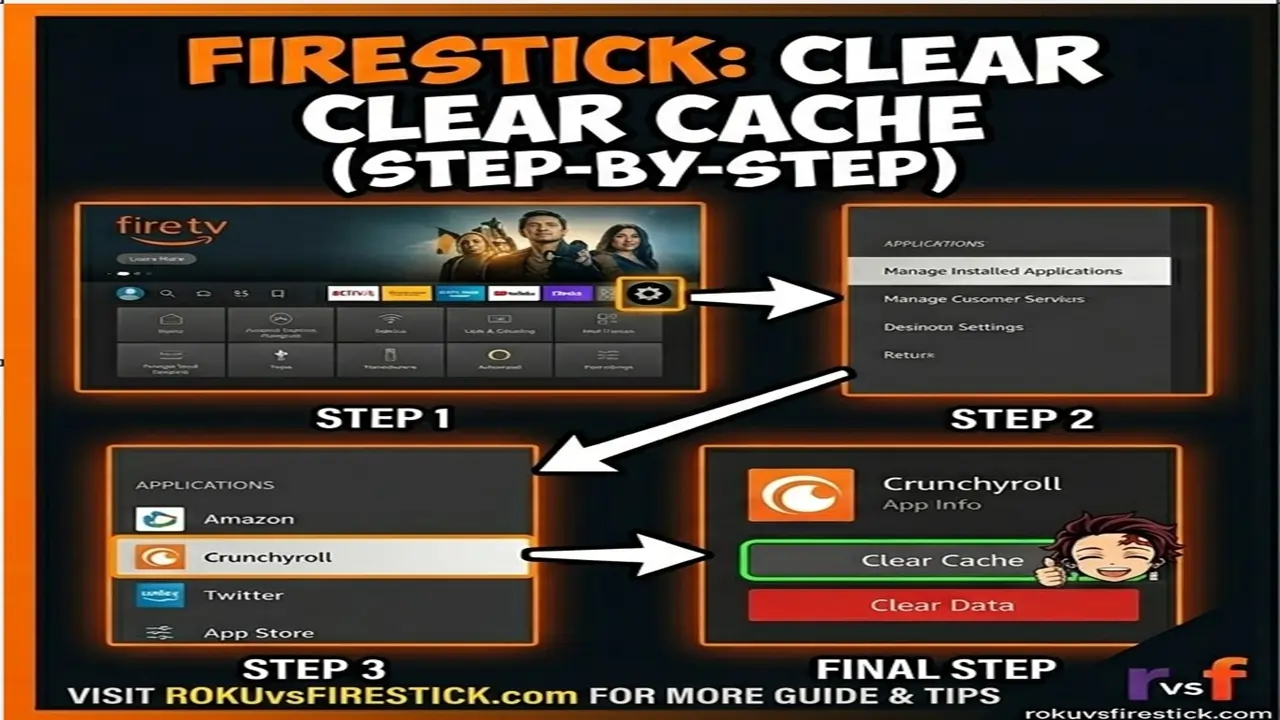
Crunchyroll on the Firestick often encounters issues such as “Black Screen” or “App Crashing.” The primary causes for this are typically low internal storage or a corrupted cache.
Deep Clean: Clear Cache & Data:
- Go to Firestick Settings and click on Applications.
- Select Manage Installed Applications, then scroll down to find Crunchyroll.
- First, select Clear Cache, then click on Clear Data. (Note: Clearing Data will require you to log in again. But it resolves 90% of errors.)
“If you aren’t getting the right results, check out our guide here: [How to Clear Cache on Firestick], this will clear out old junk data.”
Force Stop & Restart:
If the app is “freezing,” click on “Force Stop” within the same menu. Then, unplug your Firestick and plug it back in after 30 seconds.
“If your device is freezing repeatedly, you may need to [Reset Your Firestick to factory settings] so that the software runs like new.”
Fire OS 8 Update Check:
For the new security patches released in April 2026, go to Settings > My Fire TV > About > Check for Updates. An outdated OS version may block Crunchyroll’s new security protocols.
For Roku Device Users (Roku Ultra, Express & Streaming Stick)

Roku devices often encounter a “Channel Loading Error,” particularly when new episodes are released.
The Secret System Restart (Pro Trick):
If your Roku remote is unresponsive or an app has frozen, try this button combination:
- Home Button: Press 5 times.
- UP Arrow: Press 1 time.
- Rewind: Press 2 times.
- Fast Forward: Press 2 times.
- (Your Roku will automatically reboot, and the system-level cache will be cleared. This trick is currently going viral on US forums.)
“In addition to the secret code, you can also manually [clear the cache on Roku] via the settings menu if you are experiencing streaming lag.”
The “Remove & Re-Add” Method:
- Navigate to the Crunchyroll Icon, Press the star (*) button, and select “Remove Channel.“
- Now, go to Settings > System > System Restart to reboot the device (This step is mandatory!).
- After the reboot is complete, go to “Streaming Channels” and reinstall Crunchyroll.
“After reinstalling the app, follow our easy step-by-step guide on [Crunchyroll Activate].”
Network Connection Reset:
If the video is not loading, go to Settings > System > Advanced System Settings > Network Connection Reset. This refreshes the Roku’s IP address.
“If all the fixes fail, your last option is to [Reset Roku]; however, please note that this will delete all your data.”
For Mobile Users (Android & iOS)
If you are streaming on your phone:
- Update the App: Visit the Google Play Store or App Store to check if you are using the latest version dated April 1, 2026.
- Storage Check: Ensure you have at least GB of free space; otherwise, Crunchyroll will display a “Low Memory” error.
Troubleshooting: Network & Buffer Issues (US/Canada Guide)
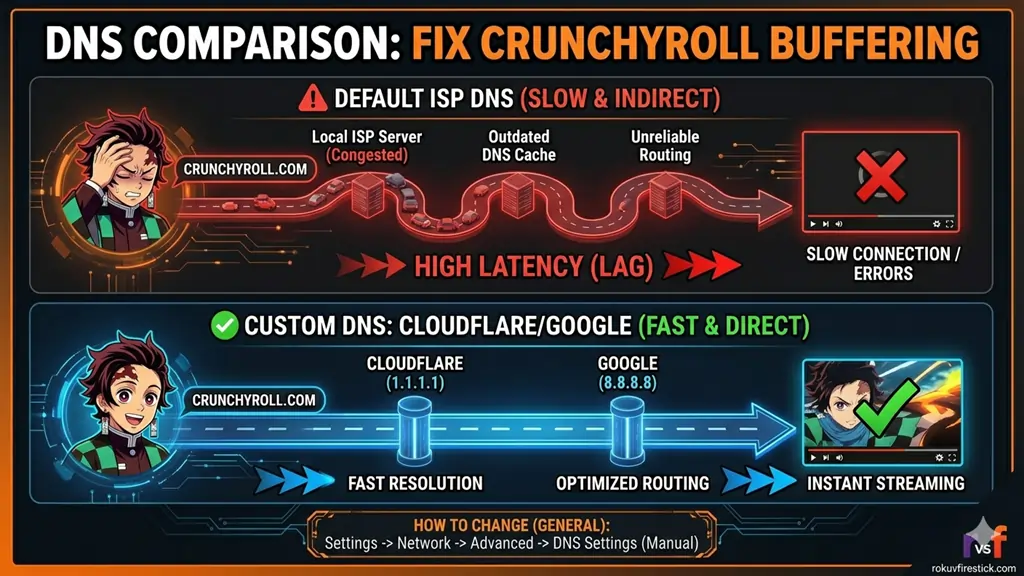
If your servers are showing as “Green” and your device is functioning correctly, the issue may lie with your internet connection or ISP (Internet Service Provider). In 2026, some technical glitches have been observed affecting Starlink and Fiber optic users in the US and Canada.
DNS Optimization for Buffer Free Streaming
Your local ISP’s DNS is often slow, which leads to “Video Playback Errors.” To fix this, use the DNS servers listed below on your router or device:
- Google DNS: 8.8.8.8 (Primary) | 8.8.e.4 (Secondary)
- Cloudflare DNS: 1.1.1.1 (Best for speed in 2026)
- Why do this? These DNS serves connected faster to Crunchyroll’s global servers, thereby reducing buffering by upto 40%.
VPN Blocks & Error 403 / 1015
In 2026, Crunchyroll upgraded its security system (powered by Akamai).
- The Problem: If you are using a VPN (Even if you are located in the US), Crunchyroll may block your access by flagging your IP address as “suspicious.” This results in Error 403 (Forbidden) or Cloudflare Error 1015 (Rate Limited).
“If you are unable to log in to your Premium account, please check the latest[Crunchyroll Subscription plans 2026].“
- The Fix: Immediately disable your VPN, clear your browser’s cookies, and try accessing the site in “Incognito Mode.” If your IP address has been blocked accidentally, restart your router to obtain a new IP address.
ISP Throttling (Starlink & AT&T Users)
In the US, many ISPs “throttle” (slow down) speeds during peak streaming hours (from 6 PM to 10 PM).
- Starlink Fix: If you are using Starlink, check your “Obstruction Map.” Due to new satellite updates in April 2026, micro-outages may occur that cause streaming apps to crash.
- Speed Test: Check your speed at Fast.com. If your speed is below 25 Mbps, you will not be able to stream in 4K or 1080p. In this case, go to the Settings within Crunchyroll and set the “Quality” to 720p.
When Is The Crunchyroll Down Issue More Likely To Occur?
While we’ve already explained the main reasons why Crunchyroll goes down, let’s look at when it’s more likely to happen:
- When New Episodes Are Released: When a maximum number of people log in at the same time to watch new episodes, the pressure on the server increases.
- At Peak Times: During night or evening hours when most people are at home and watching anime, the site has more traffic at that time.
- During Big Events: Such as Anime Expo or Comic-Con, traffic on Crunchyroll may increase during these events.
Why Is Crunchyroll Slow Today? (Spring 2026 Anime Rush)
A new anime season begins today (April 1, 2026). There are several “blockbusters” shows that millions of people are logging in simultaneously to watch:
- The Beginning After the End (Season 2): The hype surrounding this series is highest in the US, creating a risk of server crashes.
- Classroom of the Elite (Season 4): “Internal Server Error 500” frequently occurs during its premiere.
- Reborn as a Wending Machine (Season 3): Traffic spikes can be observed due to its dedicated fan following.
Expert Advice: If a new episode has been released, try to watch it one hour after its release. This reduces the server load and ensures a smooth viewing experience.
Why Do Crunchyroll Down Errors Only Happen at Night or During Weekends?
You may have noticed that Crunchyroll seems to display “Server Connection Errors” most frequently, precisely when you return from work or school, tired and ready to watch some anime. This is not a matter of bad luck, but rather stems from these three major technical reasons as of April 2026:
Global Peak Traffic (The “Prime Time” Load)
In the US and Canada, Global peak streaming hours occur between 7:00 PM and 11:00 PM (EST/PST). When millions of anime fans stream simultaneously in 4K, the pressure of Crunchyroll’s load balancers becomes so intense that the servers begin returning “Request Time Out” errors. On weekends, this traffic surges by up to 45%, which is the primary cause of server crashes.
Major Weekend Premiers (The Saturday Rush)
Most blockbuster anime series (such as *One Piece: Elbaph Arc* and the new Spring 2026 shows) release their episodes exclusively on Saturdays or Sundays.
- The “Simulcast” Problem: The moment an episode drops, thousands of people hit the “Play” button simultaneously, within the very same second. The premiere on April 1, 2026, rendered the servers nearly unresponsive for the first two hours.
ISP Throttling & Network Congestion
- ISP Throttling: On weekends, when the internet traffic is high, providers like AT&T, Verizon, or Xfinity throttle (slow down) the speeds of streaming apps to prevent network overload. This leads you to believe that Crunchyroll is down, whereas the actual issue lies with your connection.
- Maintenance Windows: Crunchyroll often performs its backend maintenance during its “off-peak” hours, which turn out to be prime time (night) for the rest of the world (India or Europe).
Basic Troubleshooting For Common Crunchyroll Error Codes
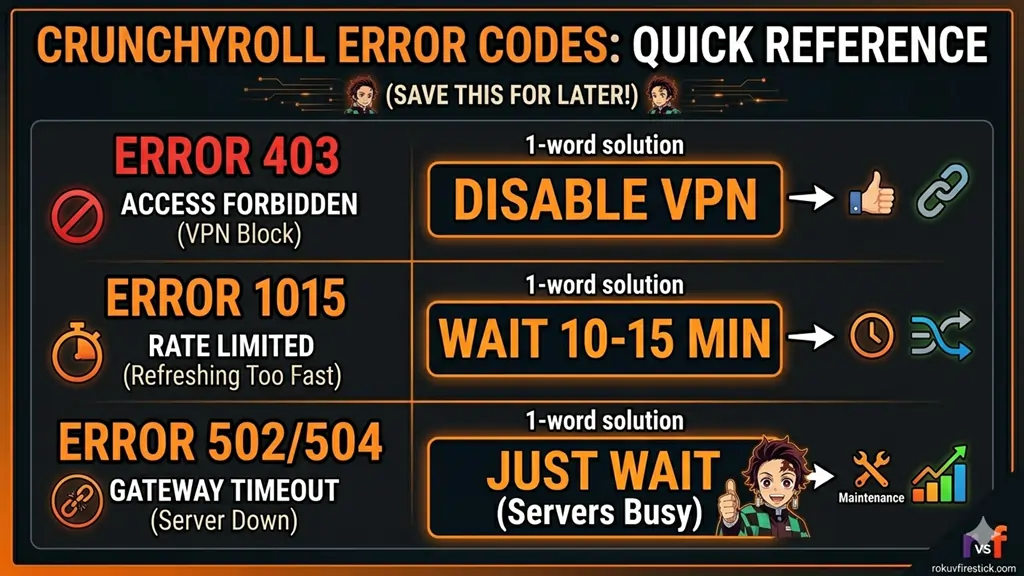
If your app is still not working after trying the hardware fixes listed above, you may have encountered a specific error code. The solutions provided below are designed to fix the most common issues of 2026:
Understanding Error Codes (403, 1015, 502)
- Error 403 (Forbidden): This typically occurs when your VPN has been blocked. Solution: Disable your VPN and use your browser’s incognito windows.
- Error 1015 (Rate Limited): This means you are refreshing too rapidly. Take a break of 5-10 minutes and then try again.
- Error 502/504 (Gateway Timeout): This is a 100% server-side issue. There is nothing you can do about it; simply wait for the servers to come back online.
“If you are frustrated by servers frequently being down, check out our guide:[How to cancel Crunchyroll Membership].”
Browser-Specific Fixes (Chrome, Safari, Edge)
If you are watching on a PC:
- Clear Cache & Cookies: Go to your browser settings and clear the cache for “All Time.” The new 2026 web player tends to crash when encountering old data.
- Disable Extensions: Often, “Ad-blockers” prevent Crunchyroll’s new player from loading. Try temporarily disabling them to see if that resolves the issue.
- Try a Different Browser: If you are experiencing issues in Chrome, try using Opera GX or Microsoft Edge; their RAM management is generally better suited for streaming.
Network & Device Power Cycle
- Router Restart: Turn off your router for 60 seconds, then turn it back on. This refreshes your IP address.
- Update the App: Visit the Google Play Store or App Store to confirm that you are using the latest version (April 2026).
Contacting Crunchyroll Support
If nothing else works, visit their Support page and raise a ticket.
- Pro Tip: Be sure to include your device model (e.g., Firestick 4K Max) and the error code in the ticket to make it easier for them to resolve the issue.
🛍️Anime Fan Alert: While your account is being recovered, visit the Crunchyroll Store for official merch featuring your favorite anime characters. Here, you’ll find the latest 2026 figurines and apparel!
🛠️Quick Troubleshooting Resources (2-Minute Fixes)
| Problem | Expert Solution Guide (Click to Read) |
|---|---|
| Firestick Buffering? | ⚡[How To Clear Cache On Firestick] |
| Roku Lagging/Freezing? | 🧹[Clear Cache On Roku (Secret Code)] |
| Remote Not Responding? | 🎮[Roku Remote Not Working? Fox Now] |
| App Still Crashing? | 🔄[Reset Roku to Factory Settings] |
| Device Runing Slow? | 🚀[Reset Firestick to Factory Settings] |
Final Thoughts
Your hardware (Roku vs. Firestick) serves as the foundation of your streaming experience. If you find that your current device is freezing frequently, be sure to read our detailed comparison: Roku vs Firestick: The Ultimate 2026 Battle.
If you have followed all the steps outlined above and are still unable to log in, this is 100% a consequence of the March 2026 Security Breach. In such a scenario, resetting your password is your only remaining option.
Q. Is Crunchyroll Down in the USA right now?
For real-time status updates, please check DownDetector US or Crunchyroll’s official Twitter account (@Crunchyroll). Temporary outages are common during the release of new episodes in April 2026.
Q. Why is Crunchyroll not working on my Firestick?
Apps on the Firestick often crash due to a corrupted cache. Go to Settings > Appearance> Crunchyroll, select “Clear Cache,” and restart the device.
Q. How to fix the Crunchyroll “Request Timed Out” error?
This error occurs when the server is busy. Restart your router or use Google DNS (8.8.8.8). If it still doesn’t work, try again in 30 minutes after the episode is released.
Q. Was my Crunchyroll account hacked in the March 2026 Breach?
If you are unable to log in, immediately reset your password and enable 2FA (Two-Factor Authentication). Crunchyroll has force-logged out several suspicious accounts for protection purposes.