
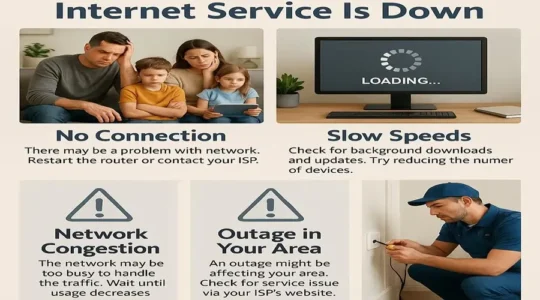
Are your streaming experiences being disrupted by sudden internet outages? Are you unable to watch your favorite shows properly on platforms like Netflix due to frequent buffering? If you’re a Spectrum customer, you may be experiencing a “Spectrum Down” situation. It can be very frustrating when this happens. This article will explain the five most common Spectrum Down issues, along with easy and effective solutions to fix them.
The 5 Most Common Spectrum Down Problems And How To Fix Them: A Detailed Guide
Problem 1: The Internet Is Completely Down (No Internet Access)
This problem is very common and frustrating. All your devices, laptops, phones, and Smart TVs can’t connect to the internet.
Why does it happen?
- Regional Outage: There may be a major outage connected to the Spectrum’s network in your area.
- Modem/Router Problem: Your modem or router may not be working properly.
- Loose cables: The cable between your modem and the wall may be loose or damaged.
Solution:
- Check for outages: First, check for outages in your area using Spectrum’s official website (https://www.spectrum.com) or app. You can also search for “Spectrum Outage Map”. If there is an outage, you’ll need to wait a while.
- Power cycle: Turn off your modem and router. Unplug the power cords for both, wait 60 seconds, and then plug the modem back in. Wait until the modem’s light stabilizes (usually 2-3 minutes), and then plug the router back in. This is a kind of restart that can fix many minor problems.
- Check the cables: Make sure all cables from the modem to the wall and from the modem to the router are properly connected and there are no broken cables.
Problem 2: Slow Internet Speeds
The internet is running very slowly, causing videos to buffer, websites to load excessively, and online gaming to become impossible.
Why does this happen?
- Network congestion: This may occur due to network congestion in the evening or during peak hours, when many people simultaneously use the internet.
- Poor Wi-Fi signal: This could be because your device is far from the router or because there are thick walls in between.
- Outdated Hardware: Your modem or router may be outdated and unable to handle your plan’s speed.
Solution:
- Test your speed: You can check your internet speed by visiting websites like Ookla or Google Speed Test. If the speed is below your plan, you’ll need to contact Spectrum.
- Check devices: Ensure you don’t have too many devices connected to your Wi-Fi simultaneously. To increase speed, turn off devices that aren’t in use.
- Reposition your router: Place your router in the center of the house, in an open area, so that all rooms receive a good signal.
- Use a wired connection: If possible, connect your computer directly to the router with an Ethernet cable. This will give you the best and most stable speeds.
Problem 3: TV Signal Not Working
Your Spectrum TV is not working at all, or some channels are missing.
Why does this happen?
- Set-top box problem: Your set-top box may be freezing or not working properly.
- Cable Connection: A loose coaxial cable between the TV and set-top box can cause a Spectrum Downtime.
- Outage: There is an outage in cable TV service in your area.
Solution:
- Restart the set-top box: Turn off the set-top box, unplug it, wait for 30 seconds, and reconnect it.
- Check the cables: Make sure all the cables between the set-top box and the TV are securely connected.
- Check if channels are down: Sometimes, certain channels may be down temporarily.
Problem 4: Phone Service is Down
Check if your Spectrum Voice service is not working – you can’t make or receive calls.
Why does this happen?
- Modem Problem: Your phone service is connected to your internet modem, and if there’s a problem with the modem, your phone service will also be affected.
- Outage: There may be a phone service outage in your area.
Solution:
- Restart the modem: First, restart the modem as described earlier.
- Check the cables: Make sure the cables from the modem to the phone adapter and from the adapter to the phone are properly connected.
- Check the battery backup: If your modem has a battery backup, check if it’s working properly.
Problem 5: Frequent Disconnections
Your internet or cable TV is repeatedly connecting and disconnecting, making it difficult to work or stay entertained.
Why does this happen?
- Signal Problem: There may be a problem with the signal coming to your home.
- Old or faulty hardware: This could be due to an old modem or router.
- External Interference: Another electronic device near your cable or equipment is causing interference.
Solution:
- Restart hardware: First, restart the modem and router.
- Call Spectrum: If this issue recurs, it could be a serious problem. You should contact Spetrum’s customer service. They can remotely check your signal and send a technician if needed.
- Upgrade your modem: If your modem is very old, consider getting a newer, more modern modem from Spectrum.
Conclusion:
Having “Spectrum Down” can be a frustrating experience, but in most cases, you can fix the problem yourself by following these simple steps. Always check and restart your equipment (modem, router, set-top box) first. If the problem persists, use Spectrum’s outage reporting service and, finally, contact customer service.
This article prepares you for a solution like “Spectrum Down” and helps you find the right solution. We hope you find this information helpful.
Read More:
- How To Install the Spectrum TV App
- Spectrum TV Subscription Plans
- 5 Essential Features of Spectrum Cloud DVR
- How To Cancel Spectrum Internet Online
Frequently Asked Questions
Q: Why is Spectrum Internet suddenly not working?
Ans: Although we’ve listed the main reasons why Spectrum Internet isn’t working above, consider these as well:
- There may be network disruptions in your area.
- Your modem or router may not be working properly.
- This problem could be caused by a loose cable connection.
Ultimately, the only option is to contact Spectrum customer service.
Q: Why does Spectrum Internet keep dropping?
Ans: There are a few main reasons why Spectrum internet may be dropping frequently:
- Network problem: This could be due to network overload or outages in your area.
- Weak wi-fi signal: This could be due to your router being poorly placed or signal interference.
- Old or faulty equipment: Your modem or router may not be working properly because it’s old.
- Cable or connection issues: Loose or damaged cables can also cause internet disruptions.
- Excessive device usage: Using wi-fi on too many devices at the same time can cause unstable connections.
Although the solutions are already provided in the above troubleshooting (Spectrum Down), to resolve these issues, you can restart your modem and router, and finally contact Spectrum Customer Service if the solution is not found.